

PitBullTax vs. the Competition: Comparing Tax Resolution Software
Tax professionals evaluating resolution software usually end up looking at some combination of the same handful of names: PitBullTax, IRS Logics, IRS Solutions, Canopy, TaxHelpSoftware and TaxDome. They get grouped together because they all touch IRS representation work in some way — but they aren't built the same way, and the differences matter more than a feature checklist alone will tell you. This guide breaks down how PitBullTax compares, and links out to a detailed head-to-head against each competitor.
The Real Dividing Line: Resolution-First vs. Practice-Management-First
Before comparing individual features, it helps to understand the two categories these platforms actually fall into.
Resolution-first software — PitBullTax, IRS Logics, and IRS Solutions — was built from the ground up around the IRS collections representation workflow: Offer in Compromise, Installment Agreement, and Currently Not Collectible eligibility analysis; IRS transcript delivery; and IRS-specific form automation. Everything in the platform assumes you're doing resolution work.
Practice-management-first software — Canopy and TaxDome — was built as general accounting/tax firm operations software (client portals, document management, billing, workflow automation across any kind of engagement) with tax resolution and transcript features layered in as one capability among many, rather than the reason the product exists.
Neither approach is automatically "better" — a firm running resolution work alongside broader tax prep and bookkeeping services might value a single practice-management system that does everything adequately. A firm that runs resolution cases as its core specialty tends to get more out of a platform built specifically around that workflow.
Where PitBullTax Positions Itself
PitBullTax was built exclusively for Attorneys, CPAs, and Enrolled Agents doing IRS representation work — not adapted from a broader practice management tool. That focus shows up in a few specific ways:
- Fully automated IRS forms with built-in resolution logic. PitBullTax auto-populates IRS resolution forms and supporting schedules, runs the required calculations, and applies form-specific rules automatically, so practitioners prepare complex filings accurately without knowing every underlying calculation or regulation.
- IRS transcript delivery, reporting, and monitoring is a core, deeply integrated capability (over 2 billion transcript processed to date) rather than a bolt-on integration.
- A searchable Internal Revenue Manual is built directly into the platform, so procedural research happens in the same place as case work.
- PitBullTax Institute, the company's education division, runs IRS- and NASBA-approved CE/CPE workshops specifically on tax resolution technique — a training layer most competitors don't offer as a directly connected product.
PitBullTax vs. Each Competitor, at a Glance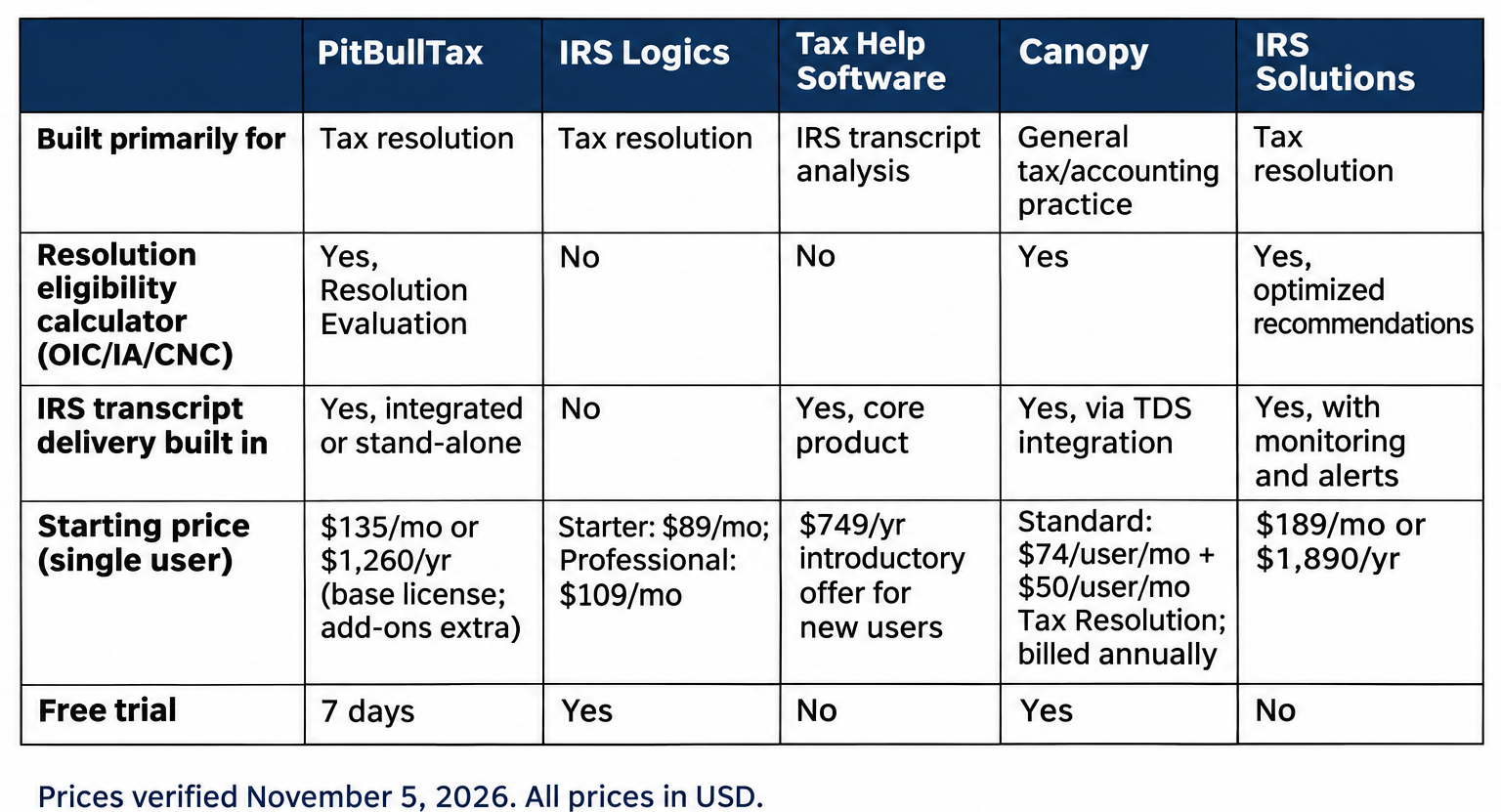
Pricing and feature specifics for competitors change; always confirm current details directly with each vendor before deciding. See PitBullTax's own feature comparison chart for a visual side-by-side.
Deep-Dive Comparisons
This hub links to a dedicated, detailed comparison against each major alternative:
- PitBullTax vs. Canopy Tax — a resolution-first platform against a broader practice management suite with resolution features added.
- PitBullTax vs. IRS Logics — two resolution-specific platforms, compared feature by feature.
- PitBullTax vs. IRS Solutions — resolution eligibility, transcript monitoring, and community/education positioning compared.
- Best TaxDome Alternative for Tax Resolution Work — for firms evaluating TaxDome specifically for resolution casework rather than general practice management.
What PitBullTax Users Say
Practitioners who've made the switch to a resolution-specific platform describe a consistent pattern: fewer manual calculations, more cases handled per year. Katharine LaBoda, a PitBullTax user since 2014: "I can do so many more cases per year just because of the speed and efficiency of the software." Norris Lozano: "The Pitbull platform delivers accurate and reliable results. It has exceeded our expectations in handling even the most complex steps of our work flow such as transcript analysis generation... The software automation has streamlined our workflow and improved the quality and cost efficiency of the services we provide to clients."
PitBullTax is also recognized by and partners with several of the field's core professional organizations — including NSTP, NAEA, ASTPS, CSEA, and Roz Strategies — which matters for practitioners who weigh a vendor's standing in the tax resolution community as part of the buying decision.
What Switching Actually Costs — Beyond the License Fee
Software comparisons tend to focus on sticker price, but the real cost of choosing (or switching) a platform includes onboarding time, staff training, and data migration — costs that are easy to underestimate and that apply regardless of which of these five platforms a firm chooses.
Onboarding and training time. A resolution-specific platform with built-in eligibility logic (like PitBullTax's Resolution Evaluation) generally has a shorter learning curve for the core resolution workflow specifically, since the software is guiding you through a purpose-built sequence rather than a general-purpose system you have to configure to fit resolution work. General practice management platforms often have a broader feature surface to learn, even if you'll only use a fraction of it for resolution casework.
Data migration. Moving existing client files, case histories, and documents between platforms is real work, and it's a major reason firms tend to under-evaluate alternatives once they've settled on a system — the switching cost itself becomes a reason to stay, independent of whether the current platform is actually the best fit. This is exactly why testing thoroughly during a trial period, before committing, matters more than it might for a lower-stakes software purchase.
Total monthly cost at realistic usage. A firm evaluating PitBullTax's Single User License ($135/month) alongside the IRS Transcripts add-on ($44/month) and Case Management and Billing ($39/month) is looking at roughly $218/month for a fully-equipped single-user setup — a figure worth comparing directly against a competitor's equivalent bundle (base license plus whatever add-ons replicate the same functionality) rather than comparing base prices alone, since starting prices rarely reflect what firms actually pay once they've added the modules they need.
Questions to Ask Every Vendor Before Committing
Regardless of which platform you're evaluating, get direct answers to these before signing anything:
- What's the actual monthly or annual cost once every add-on your practice needs is included — not just the advertised starting price?
- Is there a genuine trial period against real client data, or only a guided demo?
- What happens to your case data if you cancel — can you export it, and in what format?
- Is customer support included, or a paid add-on? What are the response-time expectations?
- How often is the resolution logic (IRS Standards, form versions) updated, and is that update automatic or something you have to request?
How to Actually Evaluate These Platforms
Rather than relying on any single comparison (including this one), the most reliable evaluation method is:
- Run an actual case through each platform's trial. PitBullTax offers a 7-day free trial specifically so you can test the Resolution Evaluation and transcript workflow against a real client file.
- Price out your actual usage, not the advertised starting price — per-user add-ons (transcripts, case management, e-signature) change the real monthly cost significantly across all these platforms.
- Weigh resolution-specific depth against general practice management breadth, based on how much of your revenue comes from IRS representation work specifically versus broader tax and accounting services.
Ready to see the resolution-first approach directly? Schedule a PitBullTax demo or start a 7-day free trial.
Sources: PitBullTax Comparison to Competition (pitbulltax.com/competition.html); PitBullTax Pricing (pitbulltax.com/pricing.html); PitBullTax homepage testimonials & partner logos (pitbulltax.com); IRS Logics feature overview; IRS Solutions feature overview; Canopy pricing; TaxDome pricing (multiple third-party 2026 pricing roundups — verify current rates directly at taxdome.com before publishing). Competitor pricing above reflects third-party research as of Nov 2026.